Your career site’s job search section is a crucial element of the candidate journey.
The typical errors on job search pages include utilizing your ATS’s URL instead of your own domain, allowing your ATS logo to eclipse your brand, depending on dropdown filters rather than crawlable links, losing your favicon on the job site, and publishing vague job descriptions. Each of these detracts from both the candidate experience and your search visibility.
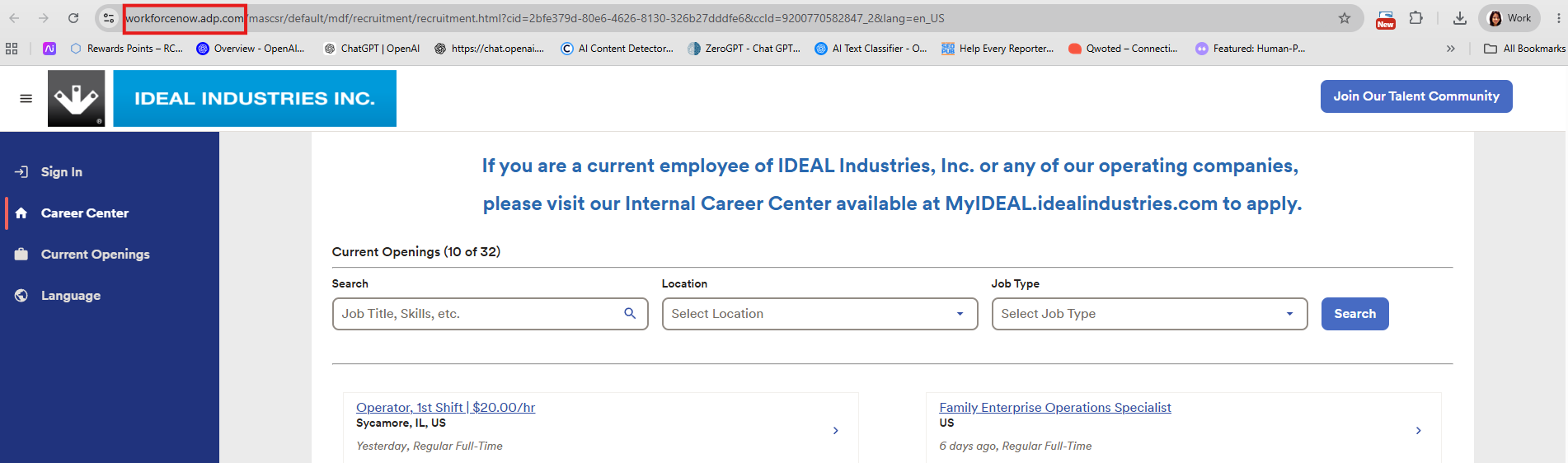
Nonetheless, many job search pages commit some frequent errors. I recently encountered an employer, Ideal Industries, whose job search page had 5 issues they could rectify to enhance candidate experience (and boost pipeline/traffic).
I don’t intend to target Ideal Industries. They appear to be a remarkable company with 107 years of experience and a commendable Glassdoor rating of 3.8! I could mention numerous other examples of reputable employers making similar mistakes.
Complicating matters is the fact that job search pages generally depend on applicant tracking systems, so you’re dealing with another entity.
Quick Overview: 5 Job Search Page Errors to Resolve
- ATS URL in the address bar — your ATS’s domain is receiving the SEO credit, not yours
- ATS logo overly prominent — candidates should focus on your brand, not your vendor’s
- Dropdowns instead of linked pages — Google can’t crawl a filter, but it can crawl a link
- Absence of favicon — your branded favicon should accompany candidates to the job description
- Vague job descriptions — copy-pasted intros and unclear responsibilities drive away the right applicants
Here are the 5 errors your job search page might exhibit along with the solutions:
1) Your ATS URL Shows Instead of Your Company Name
The URL for your job search page should contain your name (e.g. jobsearch.idealindustries.com) and not reference your ATS. This ensures a better candidate experience and is also essential for Google to direct more traffic your way since Google attributes credit to whatever domain appears in the URL—and if it shows your ATS’s name, they gain the Google SEO (Search Engine Optimization) credit.
You need to hide the URL so that it displays your domain name.
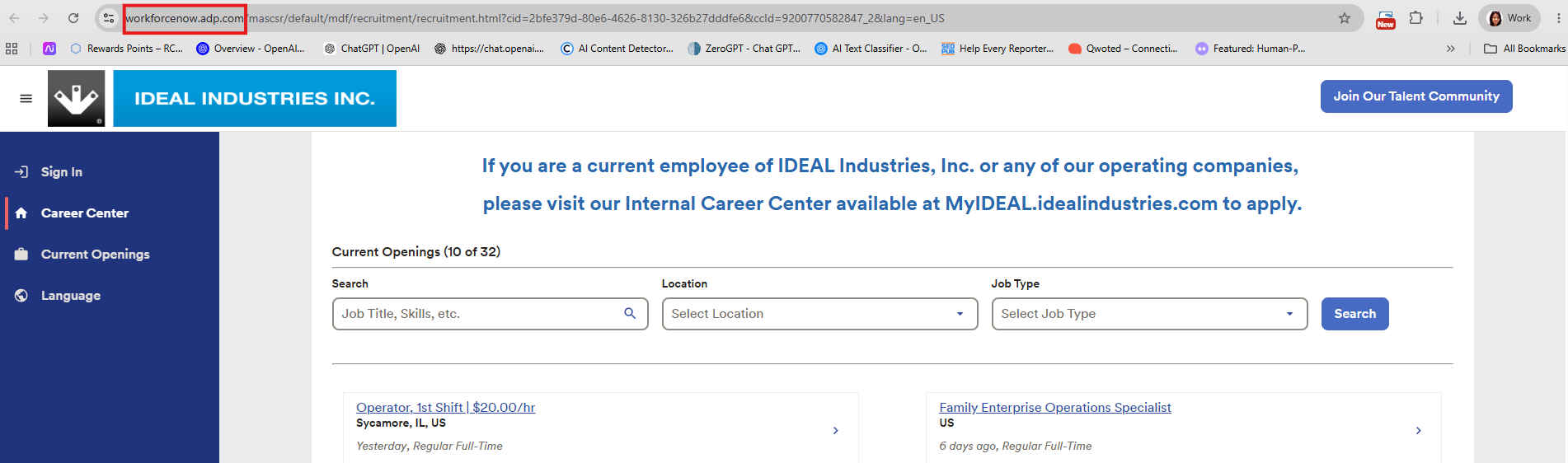
The solution: Request your ATS provider or internal technical team to mask the job search URL with your own domain. Most ATS platforms provide this — it’s commonly termed URL masking or a custom domain setup. It’s a one-time technical adjustment that safeguards your SEO and maintains your brand at the forefront from the initial click.
2) Your ATS Logo Is More Prominent Than Your Brand
Do you notice how Ideal Industries’ logo is barely more visible than the logo of the ATS provider, ADP? You want to avoid any confusion for your candidates regarding the page they are viewing. They shouldn’t be concerned with ADP; their focus should be on you!
Thus, ensure your logo is prominent and request your ATS to make their logo secondary (preferably much smaller).
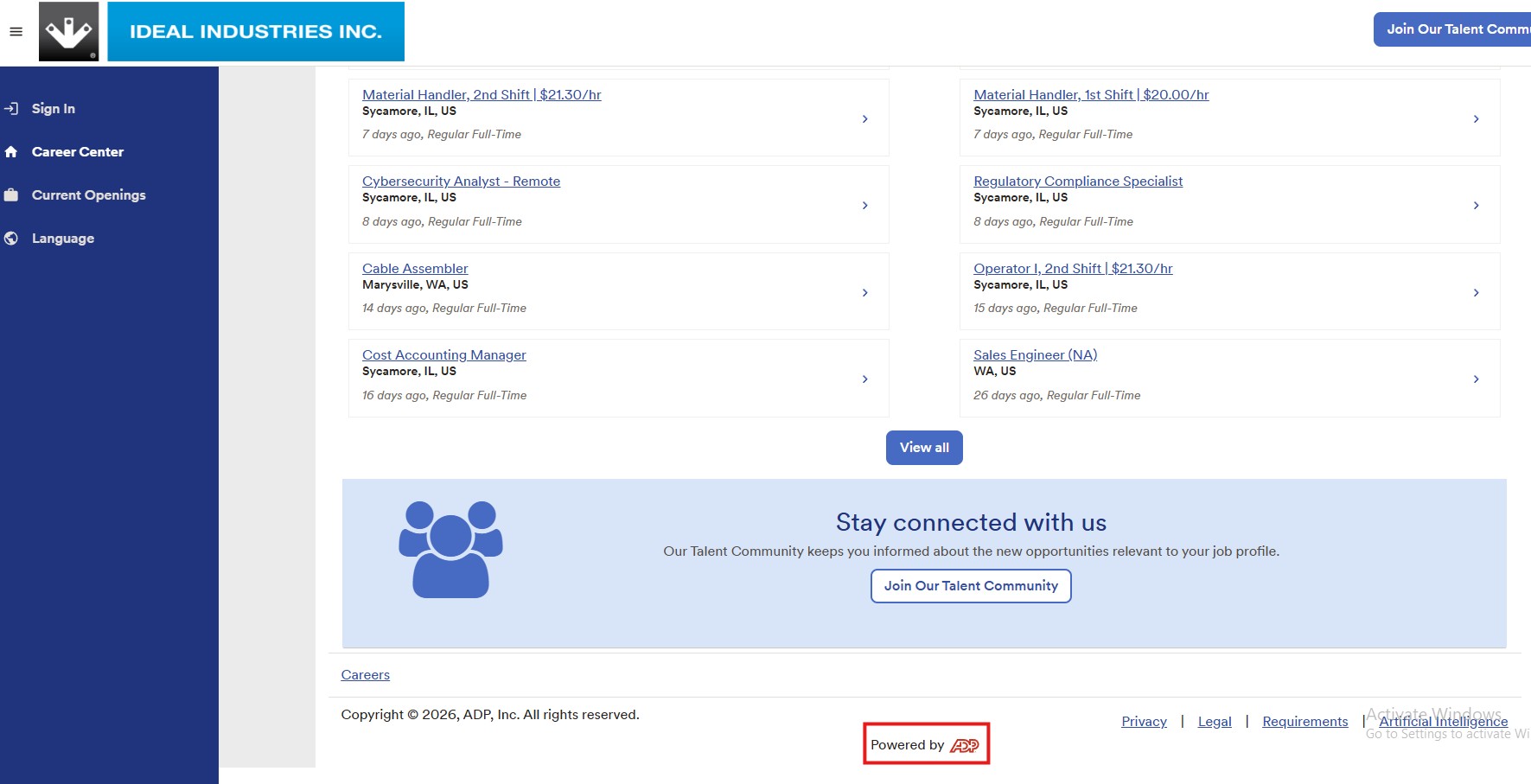
The solution: Request your ATS provider to diminish the size and emphasis of their logo on your job search pages. Most will agree to this. Your logo should be the primary visual element. If a candidate has to double-check to confirm whose page they’re on, something is amiss.
3) You Use Dropdowns Instead of Linkable URLs
Dropdown filters may seem advantageous to a candidate already on your page. The issue is, they are invisible to Google.
When a user filters IDEAL’s job search portal by “Sycamore – IL” or “Regular Full-Time,” the results appear. However, the URL remains unchanged. There’s no unique page for Google to crawl, index, or show to a job seeker searching for “IDEAL Industries jobs in Illinois.” That traffic gets lost because, technically, the page doesn’t exist.
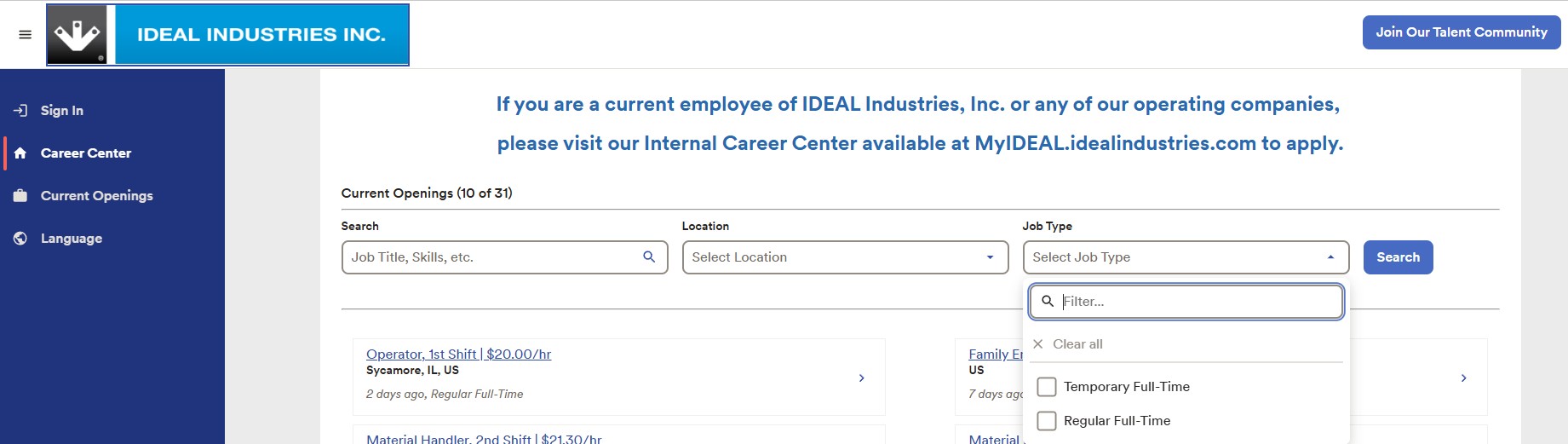
Instead, what you need are actual hyperlinks (one for each location and job category) that each point to a dedicated, indexable page. Google considers those links as a breadcrumb trail and utilizes them to showcase your openings to the right candidates at the right time.
Take Culture Amp’s careers page as an example of how this is effectively implemented. Each of their office locations (Melbourne, Sydney, New York, London, Berlin) has its own linked URL. A candidate interested in Chicago positions doesn’t have to open a dropdown. They click “See open roles →” and arrive directly on a filtered page. Google can discover that page as well.
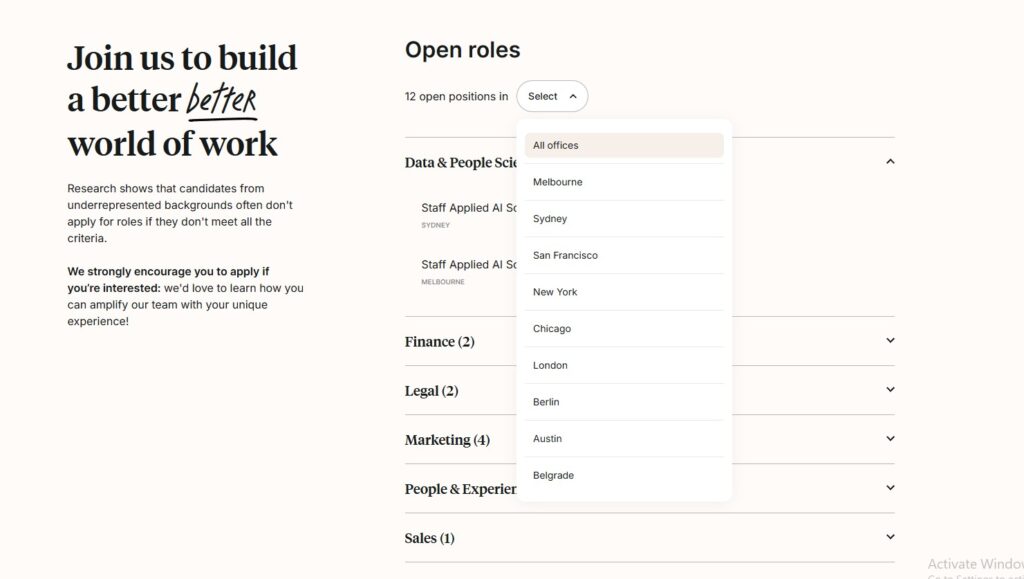
IDEAL’s ADP portal doesn’t function that way. The location and job type filters exist solely as interactive components. There’s no page supporting them. This results in no SEO value, no Google indexing, and no organic traffic from candidates who were never going to find the job board directly in the first place.
The solution: Collaborate with your ATS or internal tech team to create static, linked pages for each location and department with open positions. Directly ask your ATS provider if this is supported. Some platforms facilitate this more than others, but it’s almost always possible.
For inspiration on what an effective job search page entails, explore our compilation of the
best career site job search illustrations.
4) You Lose Your Favicon (and Your Identity With It)
Are you aware of what a favicon is? Your favicon serves as a small yet impactful branding indicator, and the majority of ATS systems completely remove it.
For instance, Ideal Industries’ favicon illustrates a white arrow pointing down within a gray square:

Your candidates ought to see that favicon on every page associated with your company career site that they navigate.
Nevertheless, you might observe that in the case of Ideal Industries, the favicon for the job search page is that of ADP rather than Ideal. This can be perplexing for the candidate seeking a connection with you as the employer (not your ATS).

Your favicon should accompany the candidate on every job search page they interact with, all the way down to the job description.
If your job search page does not feature your branded favicon, simply reach out to your ATS or your internal tech department.
The solution: consult your ATS provider or internal technology team about substituting the default favicon with your branded option. It’s a minor request that most platforms can fulfill, and it keeps your branding consistent from the job search page to the specific job description.
5) Your Job Descriptions Are Too Generic to Attract Candidates
A job description is frequently the initial genuine dialogue you have with a candidate. If it’s unclear, ambiguous, or copied from another position, you’re already beginning on the wrong foot.
Consider IDEAL Industries’ Cybersecurity Analyst posting as an example:
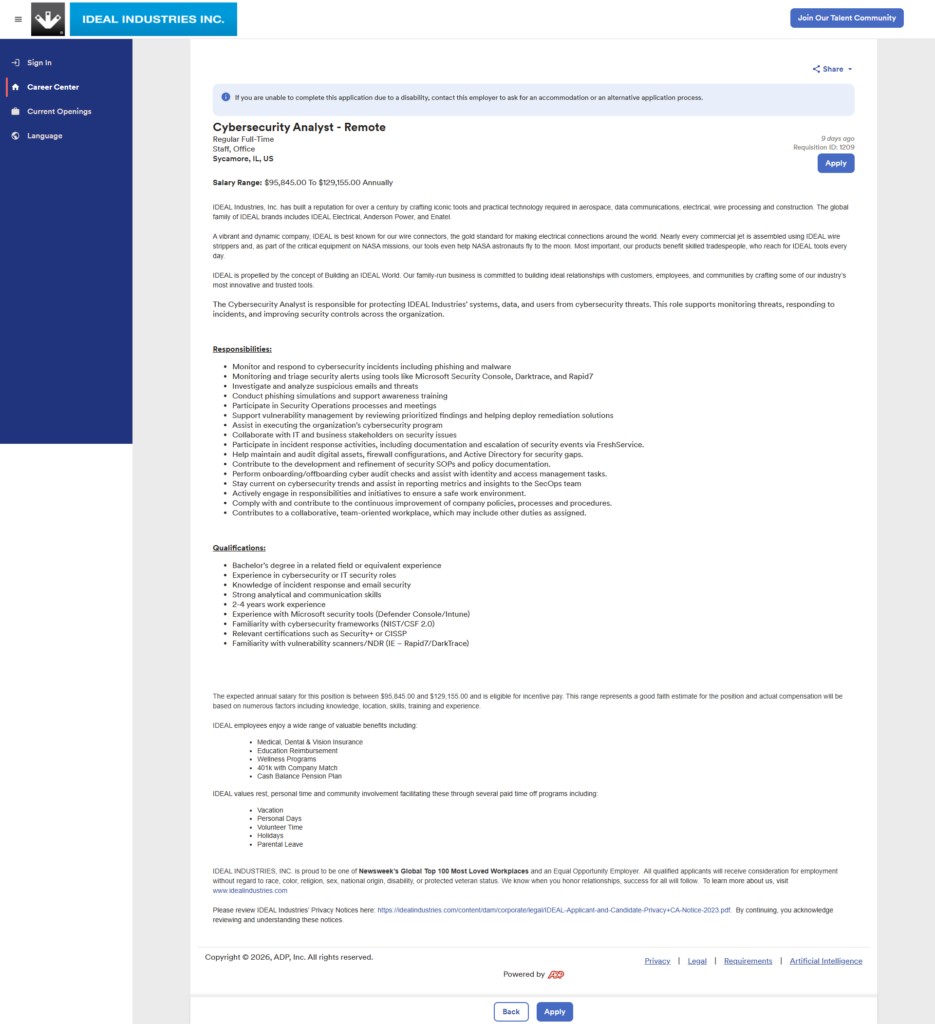
Here’s the good news: this JD has improved in several significant aspects. The salary range ($95,845–$129,155) is right at the top. The responsibilities highlight specific tools — Darktrace, Rapid7, Microsoft Defender, FreshService — which indicates to candidates that IDEAL truly understands what this role entails. Furthermore, the EEO statement appears once, clearly, at the end, which is an advancement over previous IDEAL postings where it was duplicated.
However, here’s where it still falters.
- The company introduction is unhelpful for this role. The first three paragraphs — discussing wire connectors, NASA missions, and skilled tradespeople — are generic content that appears verbatim across IDEAL’s job postings, irrespective of the role. A cybersecurity analyst doesn’t require a primer on wire strippers to determine if they want to apply. That introduction was crafted for an electrician, not a security expert. Candidates notice when a JD fails to resonate, and they move on.
- The responsibilities list lacks organization. At present, “Monitor and respond to cybersecurity incidents” sits alongside “Participate in Security Operations meetings” and “Contribute to a collaborative, team-oriented workplace.” These tasks are not on the same level. Combining high-stakes responsibilities with trivial details dilutes both. Emphasize what is most important for the role, and eliminate anything that could apply to any job at any organization.
- The qualifications require clearer organization. “2-4 years of professional experience” is concealed in the middle of the list. This is one of the first criteria a candidate uses to self-assess — it should feature closer to the top. You could also categorize the list into “Required” and “Preferred” to assist candidates who are 80% qualified to feel confident enough to apply.
- The remote work arrangement is lacking. This posting is tagged as Remote, but there’s no information in the JD regarding what that entails — time zone requirements, provided equipment, any on-site obligations. For a cybersecurity position that likely manages sensitive systems, candidates will have inquiries. Address them in the JD.
The solution: Develop a role-specific introduction that speaks directly to the type of candidate you wish to attract, prioritize your responsibilities list, and include a line or two about what remote actually means at IDEAL. Minor modifications, but they significantly impact who applies and who doesn’t.
For additional insights on what to avoid in your job postings, refer to our list of job description pitfalls to evade.
FAQs about Job Search Page Errors
1. What should be included on a job search page?
A job search page should feature your company’s branded header and footer, a prominent logo and favicon, a keyword search function, and filterable options for location and job type. Ideally, each location and department should connect to its own dedicated page to enable Google to index your openings and present them to the appropriate candidates.
2. How can I enhance my career site for Google?
To enhance your career site for Google, ensure your job search page utilizes your own domain, not your ATS provider’s URL. Generate dedicated, crawlable pages for each job category and location instead of depending on dropdown filters. Consistent branding, swift load times, and functional links also indicate credibility to both Google and candidates.
3. Why is my ATS URL detrimental to my SEO?
When your job search page URL contains your ATS provider’s domain instead of your own, Google attributes that domain with the traffic, not yours. Consequently, your career site forgoes organic search rankings even when candidates are actively searching for jobs at your organization. Masking the URL with your own domain rectifies this.
Why I wrote this
The issues mentioned above are typically resolved through a combination of discussions with your ATS partner and someone technical within your own organization. Certain recruiting software, like Ongig (shameless plug), resolves all of this for you.
Your branding and the candidate experience are crucial.